 Noel D'Costa
Contents
- Why CPI matters, in my experience
- What SAP CPI is, and what it isn't
- SAP CPI architecture explained: how it works in practice
- The message flow in practice
- Components of SAP CPI architecture
- Dates that shape an integration plan
- How CPI compares to SAP PI/PO
- PI/PO migration: what it actually involves
- Common integration patterns
- Frequently asked questions
- Next step
SAP CPI (Cloud Platform Integration) is SAP's cloud middleware for connecting SAP and non-SAP systems. Today it is called Cloud Integration, the core capability of SAP Integration Suite on SAP Business Technology Platform (SAP BTP).
It moves messages between applications, transforms their format and routes them to the right target. If you still run SAP PI/PO, the clock matters: mainstream maintenance for SAP NetWeaver 7.5, which includes PI/PO, ends at the end of 2027.
This guide covers what CPI does, how its architecture works, how it compares with PI/PO and how to plan the move. It is written for integration leads and CIOs, not only developers.
I have seen teams spend months building brittle custom scripts to connect SAP and non-SAP systems. Something works at first. Then a system update changes a field name, or a new API version rolls out, or traffic doubles.
The script breaks quietly. Nobody knows until a report pulls stale data or an order sits unprocessed for three days.
CPI replaces that with managed, reusable integration flows. Not because it is simpler (it often isn't), but because the architecture is built to be monitored and maintained. Small decisions made early in CPI design compound into technical debt faster than most teams expect.
My advice to any company still on SAP PI/PO is to move to SAP Integration Suite. The most common integration failure I see is not spending enough time on integration.
SAP's own migration guide describes Cloud Integration as the capability for designing and running integration flows across cloud, on-premise and hybrid setups. It covers application-to-application (A2A), business-to-business (B2B) and business-to-government (B2G) scenarios. Most consultants still say "CPI" or "SAP CI" for it, and that is fine.
SAP Integration Suite bundles Cloud Integration with other capabilities. The main ones are API Management, Event Mesh, Integration Advisor, Trading Partner Management, Open Connectors and Migration Assessment.
What CPI does: moves data between systems, transforms message formats, routes to the right target, and handles errors and retries. It connects SAP systems (S/4HANA, SuccessFactors, Ariba) and non-SAP platforms (Salesforce, Workday, ServiceNow) through standard adapters.
What it doesn't do: store data long-term, replace an ERP, or act as an ETL tool for bulk data migration. It is built for real-time or near-real-time messages. Using it as a data warehouse or a migration tool causes architecture problems later.
CPI versus SAP BTP: BTP is the whole platform: application development, data, AI, analytics and integration. CPI is one service on it. A BTP architect designs across services; a CPI specialist owns flows, adapters, mappings and connectivity.
The diagram below shows the integration scenarios CPI is built for. Cloud to cloud, on-premise to cloud, business to business (B2B), business to government (B2G), and connections to users and devices.
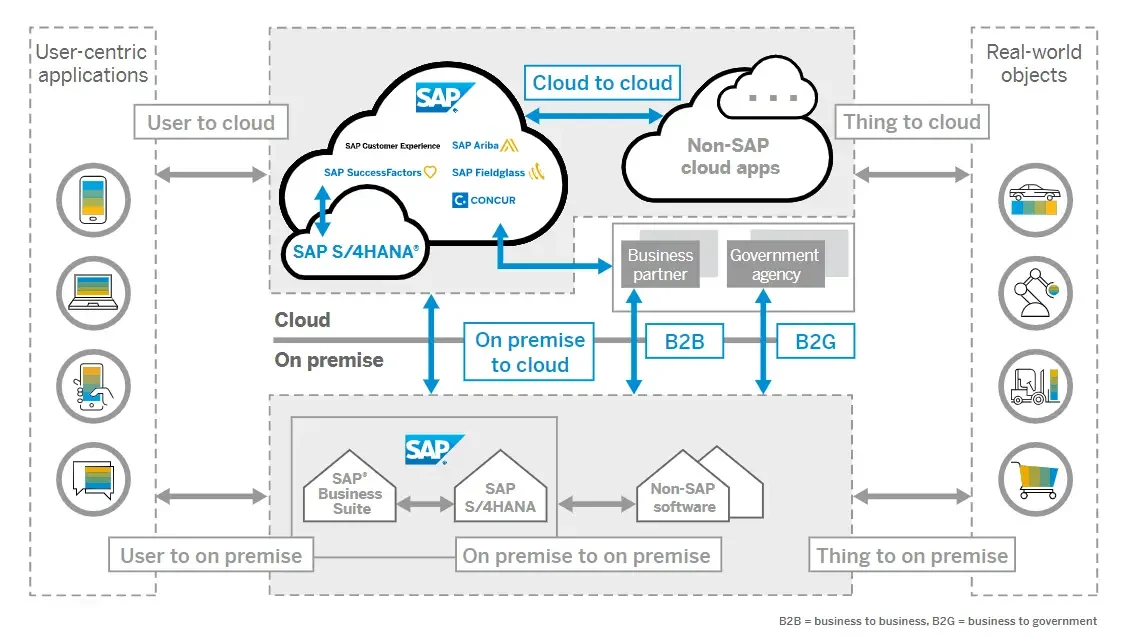
Understanding CPI architecture is not just for developers. In my experience, the teams that grasp how CPI handles integration at a structural level tend to make better design choices up front.
CPI runs as a multi-tenant cloud service on SAP BTP. SAP runs the platform, so you do not maintain your own integration servers. Where a flow must run inside your own network, Edge Integration Cell is an optional hybrid runtime: you design and monitor in the cloud and run the flow in your own network.
The message flow in practice
At the core is the iFlow (integration flow). Every integration in CPI is modelled as one, and each iFlow moves a message from a source to a target in three stages:
- Sender adapter. Receives the message from the source system over SOAP, REST, OData, IDoc, SFTP, JMS, AS2 or another protocol.
- Processing steps. Mapping, format conversion (JSON to XML, for example), content-based routing, calls to other systems, encryption and error handling.
- Receiver adapter. Sends the processed message to its target.
Flows run synchronously or asynchronously, depending on the use case. It is not always obvious which to choose, so test both against real volumes.
Monitoring plays a big role. You have message processing logs, trace and persisted messages, each for a different purpose. During testing or debugging, I tend to switch between trace and persist depending on how deep I need to go.
Components of SAP CPI architecture
The table maps each component to its job in the architecture.
| Component | What it does | Role in the architecture |
|---|---|---|
| Integration flow runtime | Executes iFlows | Handles routing, mapping, transformation and security at run time |
| Web-based designer | Graphical editor to build, configure and deploy iFlows | Where developers model flows; complex logic still needs Groovy or JavaScript |
| Adapters | SOAP, REST, OData, IDoc, JDBC, SFTP, JMS, AS2 and SaaS-specific adapters | Connect cloud and on-premise systems |
| Security | OAuth 2.0, SAML, TLS, certificate and key management | Protects credentials and messages in transit |
| Monitoring and operations | Message logs, error details, retries, alerting | Lets support teams find and fix failures |
| Prepackaged content | SAP-delivered integration packages on the SAP Business Accelerator Hub | Speeds up standard scenarios with tested content |
| SAP Cloud Connector | Secure tunnel from your network to SAP BTP | Reaches on-premise systems without exposing them to the internet |
| Edge Integration Cell | Optional runtime in your own data centre or private cloud | For flows that must stay on-premise |
Groovy scripts handle logic the graphical steps cannot. I often suggest keeping this light, because too much scripting leads to maintenance issues later. Packages are versioned, so no change goes into production outside a deployed package.

Three dates drive almost every integration plan right now.
- 2027PI/PO mainstream maintenance endsEnd of year, for SAP NetWeaver 7.5
- 2028Cloud Integration on Neo sunsets31 December. Neo tenants move to Cloud Foundry
- 2030PI/PO extended maintenance endsEnd of year. The last stop for any PI/PO system
Source: SAP Note 1648480 and SAP Knowledge Base Article 3355661
- PI/PO is running out of road. SAP Note 1648480 sets mainstream maintenance for SAP NetWeaver 7.5, which includes PI/PO, to the end of 2027, with extended maintenance to the end of 2030. The system does not stop on 1 January 2028, but every year after that costs more to keep.
- Neo is closing. SAP Knowledge Base Article 3355661 confirms that Cloud Integration on the SAP BTP Neo environment sunsets on 31 December 2028. Earlier CPI tenants on Neo need to move to the multi-cloud (Cloud Foundry) environment, and that move is its own small project.
- Hybrid has an answer. Edge Integration Cell runs Integration Suite flows inside your own network. That removes the most common reason teams gave for staying on PI/PO.
On commercials: if you are on RISE with SAP, check what SAP BTP entitlement your contract already includes before you buy Integration Suite capacity separately.
PI (Process Integration) and PO (Process Orchestration) are SAP's on-premise middleware. Here is how they compare with CPI.
| Factor | SAP PI/PO | SAP CPI (Integration Suite) |
|---|---|---|
| Deployment | On-premise, your servers | Cloud on SAP BTP; Edge Integration Cell for an on-premise runtime |
| Maintenance overhead | High: patching, upgrades, server management | Lower: SAP runs the platform |
| Extensibility | Deep customisation; harder to upgrade | Modular; faster updates; less low-level control |
| Licensing | Licence plus your own infrastructure | Subscription on SAP BTP, by edition |
| Investment direction | Maintenance only, no new features | Active development |
| End of mainstream maintenance | End of 2027 (extended to end of 2030) | Not applicable (cloud service) |
SAP's migration guide treats Cloud Integration as the main replacement because it covers most of what PI/PO does. Ask SAP how your edition is metered, then model it against your real message volumes before you migrate. Some companies find their integration traffic is higher than they thought.
SAP CPI is powerful when it is designed at the architectural level. When teams treat it as a configuration exercise, every small shortcut creates fragility that shows up six months later.
Migration is not an automatic conversion. Adapter behaviour differs between PI and CPI, and error handling that worked in PI can behave differently in CPI. Some flows need rebuilding; others move with small changes.
SAP provides two official tools:
- Migration Assessment. A capability of Integration Suite that connects to your PO system, extracts integration scenarios and estimates the effort to move them. SAP's tutorial covers the setup.
- Migration Tooling. A feature of Cloud Integration that semi-automates the migration of integrated configuration objects (ICOs) from PO into iFlows. Only scenarios assessed as "Ready to migrate" or "Adjustment required" can be migrated with it.
SAP Learning is clear that no single migration path fits every customer, and many run PI/PO and Integration Suite in parallel during the move. The tools reduce the mechanical work. They do not make the judgement calls about what to rebuild and what to retire.
Here is the wave plan I use as a starting point. Adjust the waves to your own inventory.
| Wave | What moves | Why this order | Owner | Exit criteria |
|---|---|---|---|---|
| 0. Inventory | Every PI interface: frequency, volume, adapter, criticality, owner | You cannot plan what you have not counted | Integration lead | Inventory signed off by business owners |
| 1. Low risk | SAP-to-SAP flows with standard content | Proves the operating model and monitoring | Integration lead | Two weeks stable in production, PI path retired |
| 2. Partners | B2B and EDI flows with key trading partners | Needs partner testing windows and coordinated cutover | Integration lead with procurement and sales | Each partner confirms in writing |
| 3. High risk | High-volume, regulated or revenue-critical flows | Moves last, with the most rehearsal | Integration architect | Volume test passed; fallback to PI rehearsed |
| 4. Retire | PI/PO shut down | Stops paying for two platforms | CIO | All flows migrated or retired; licences ended |
Keep a fallback path to PI for each wave until the new flow has run clean in production. The order matters: prove the operating model on low-risk flows before you touch the interfaces that carry revenue.
Integration testing is where time disappears. Plan regression testing with B2B partners and non-SAP targets early, because those break quietly. My SAP testing guide covers how to structure integration and regression cycles.
If the PI/PO move sits inside an S/4HANA programme, align the two plans. My ECC to S/4HANA migration guide covers the paths and deadlines on the ERP side.
The scenarios I see most often:
- S/4HANA to SuccessFactors. Organisational data, headcount and compensation changes. SAP's standard integration content covers the common scenarios; custom flows handle the deviations.
- Legacy procurement to SAP Ariba. Purchase orders out, confirmations and invoices back in. Usually two-directional.
- Finance data to SAP Analytics Cloud. Moving data from ECC or non-SAP systems into SAC.
- Salesforce to SAP. Closed deals flowing into SAP for fulfilment, invoicing and stock updates. My piece on why Salesforce-ERP integrations fail covers the design mistakes.
If integration work is already slipping on your programme, SAP Integration Suite delivery delays covers the usual causes. The overview of SAP integration platforms compares the options side by side.
What is SAP CPI and what is it called now?
SAP CPI stands for Cloud Platform Integration. It is now the Cloud Integration capability of SAP Integration Suite on SAP BTP, alongside API Management, Event Mesh and partner integration tools. "CPI" is still the everyday name for building integration flows.
What is SAP CI?
SAP CI is short for SAP Cloud Integration, the current name of what used to be SAP CPI. Both terms refer to the same capability inside SAP Integration Suite.
Is SAP CPI middleware?
Yes. CPI is cloud middleware: it sits between systems, transforms and routes messages, and handles errors and retries. It replaces on-premise middleware such as SAP PI/PO, and it does not store business data long-term.
How is SAP CPI different from SAP PI/PO?
PI/PO is on-premise middleware that you install, patch and run yourself. CPI is a cloud service on SAP BTP that SAP runs for you, with new adapters and content arriving centrally. Edge Integration Cell covers flows that must stay on-premise.
When does SAP PI/PO support end?
Mainstream maintenance for SAP NetWeaver 7.5, which includes PI/PO, ends at the end of 2027. Extended maintenance is available to the end of 2030. SAP offers Migration Assessment and Migration Tooling to help move scenarios to Integration Suite.
Is SAP CPI the same as SAP BTP?
No. SAP BTP is the platform: app development, data, analytics, AI and integration. CPI is the integration service on it.
When scoping work, budget and skills differ: a BTP architect works across services, a CPI specialist owns flows, adapters and mappings.
If you are planning a PI/PO move or designing integration for a new S/4HANA programme, start with the interface inventory. If you want a second view on the plan before you commit to it, get in touch.

Written by
Noel D'Costa
SAP BTP Cockpit issues: five problems and how to fix them
Five SAP BTP Cockpit problems come up again and again: 401 token errors, Integration Suite errors, dead links, CAP destination failures and trial apps that stop overnight. Here is what to check first for each.
SAP Integration Suite: decisions and production trade-offs
SAP Integration Suite is not just a renamed CPI, and the decisions teams get wrong are rarely about technology. This guide covers the components, PI/PO migration, legacy limits, testing and the ownership gaps behind most interface failures.
SAP BTP Cockpit: login, subaccounts and entitlements guide
The SAP BTP Cockpit is the web console for your SAP cloud accounts. Here is the login URL, how global accounts and subaccounts fit together, and the setup order that avoids rework.

SAP clean core: what it means, levels A to D and governance
What SAP clean core means for S/4HANA, how the A to D levels work, who should own the decisions and how to measure clean core compliance.
Next step
Running an ERP programme right now?
If this article touched on a programme you are live in right now, a 30-minute conversation usually gets further than another week of internal analysis.